Subscribe in a reader ScrappinFreestyle Blog | New Releases, Updates, and More!
 
ScrappinFreestyle
 
SFS MegaKit
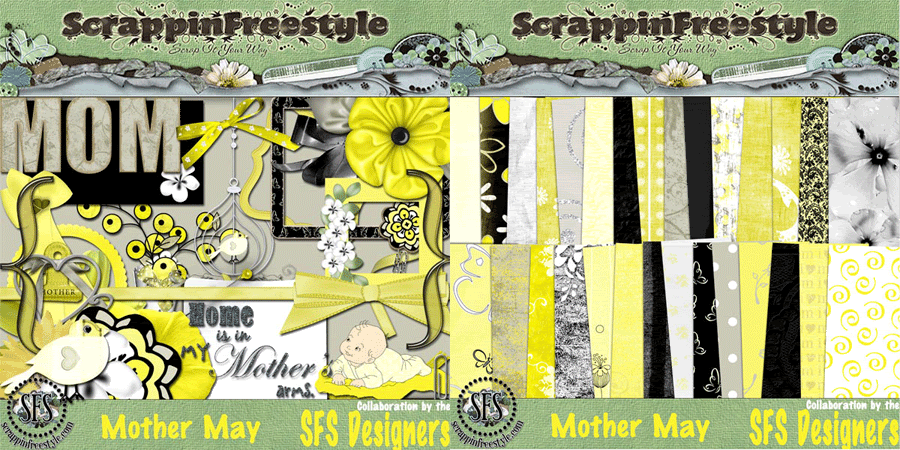
Mother May
by SFS Designers

Subscribe in a reader SFS Updates
Enter your Email to get Updates and Special Deals


Preview | Powered by FeedBlitz

Subscribe to scrappinfreestyledotcom

Powered by us.groups.yahoo.com

SFS Challenges
- ABC/123 Challenge
- Let's Get Lyrical Challenge
- Quick Page Exchange
- Everyday Elements Challenge
- Scraplift Challenge

SFS Designers


SFS Blog Archive - September 2007
- October 2007
- November 2007
- December 2007
- January 2008
- February 2008
- March 2008
- April 2008
- May 2008
- June 2008
- July 2008
- August 2008
- September 2008
- October 2008
- November 2008
- December 2008
- January 2009
- February 2009
- March 2009
- April 2009
- May 2009
- June 2009
 

July 8, 2008

Tutorials & PSE Actions @ ScrappinFreestyle

Hello Everyone!

Mega-Doodle Inspired popping in here to talk about Actions for Adobe Photoshop Elements....

A couple months ago I got a request for PSE actions. And I have to admit, I didn't even know where to start! I didn't even know how to install actions in PSE!! I searched the web high and low to find out and sadly, the tutorials out there were not clear enough for me.

SO...I installed both PSE 5 and 6 on my own computer and wrote my own tutorials! I include them with all my PSE actions.

And then during the Wednesday chat last week, one of our Challenge Hostess' mentioned that she just couldn't get any actions installed correctly in PSE. This got me to thinking. I should share my tutorials! = )

Here is a screen shot of several of my actions installed in PSE.


Downlaod Tutorials for Installing Actions in PSE 5 and PSE 6

Here are some of the PSE actions available here at ScrappinFreestyle:


Well, that's all I've got for today! I hope you'll all join us in the chat tomorrow night from 10:00 - 11:00 PM EST!!

Enjoy!


Labels: ,

April 15, 2008

April Scrapbooking Classes!

Photobucket
Tips for Text - April 2008
$20.00
Here is a great opportunity to enhance you layouts with these tips for text. This class is four weeks long starting on April 7th. Each week you will work through a lesson and an assignment posted in a private class forum. Screen shots in this class are mostly taken using Photoshop Elements, but the class works in Paint Shop Pro also with PSP screen shots included when the process differs from PSE.

Photobucket
Playing with Paper - April 2008
$20.00
Come and learn some great things you can do with digital scrapbooking papers on your layouts. This class is four weeks long starting on April 7. Each week you will work through a lesson and an assignment posted in a private class forum. Screen shots in this class are mostly taken using Photoshop Elements, but the class works in Paint Shop Pro also with PSP screen shots included when the process differs from PSE.

Photobucket
DigiScrap101 PSP - April 2008:
$20.00
Do you want to learn how to scrap digitally? Are you hoping to learn how to use Paint Shop Pro? Then this class is for you. This class is four weeks long starting on April 7. Each week you will work through a lesson and an assignment posted in a private class forum.

Photobucket
DigiScrap101 PSE - April 2008:
$20.00
Do you want to learn how to scrap digitally? Are you hoping to learn how to use Photoshop Elements? Then this class is for you. This class is four weeks long starting on April 7. Each week you will work through a lesson and an assignment posted in a private class forum.

Labels: , ,

April 8, 2008

March Scrapbooking Classes

Photobucket
DigiScrap101 PSE - March 2008:
$20.00
Do you want to learn how to scrap digitally? Are you hoping to learn how to use Photoshop Elements? Then this class is for you. This class is four weeks long starting on March 3. Each week you will work through a lesson and an assignment posted in a private class forum.

Week 1: Introduction to the program; the basics of digital scrapbooking and photo enhancement
Week 2: Creating a layout using cropping, rotating, and text options; uploading to a gallery
Week 3: Creating a layout using journaling, erasing, and shadows
Week 4: Additional layout tips; inspiration from scraplifting, sketches, challenges, and templates

Photobucket
DigiScrap101 PSP - March 2008:
$20.00
Do you want to learn how to scrap digitally? Are you hoping to learn how to use Paint Shop Pro? Then this class is for you. This class is four weeks long starting on March 3. Each week you will work through a lesson and an assignment posted in a private class forum.

Week 1: Introduction to the program; the basics of digital scrapbooking and photo enhancement
Week 2: Creating a layout using cropping, rotating, and text options; uploading to a gallery
Week 3: Creating a layout using journaling, erasing, and shadows
Week 4: Additional layout tips; inspiration from scraplifting, sketches, challenges, and templates

Photobucket
Enhancing your Elements - March 2008:
$20.00
Come and focus on the elements on your layouts. This class is four weeks long starting on January 7. Each week you will work through a lesson and an assignment posted in a private class forum. Screen shots in this class are mostly taken using Photoshop Elements, but the class works in Paint Shop Pro also with PSP screen shots included when the process differs from PSE.

Week 1: A look at fasteners – using erasing, burn/dodge, and shadows to make them look realistic; Tips for linking and merging
Week 2: Brushes; A look at clusters
Week 3: Making your own elements
Week 4: Bending a ribbon; Fun ideas for frames and photo corners

Photobucket

Fun with Photos - March 2008:
$20.00
Are you looking for fun and interesting ways to enhance and creatively present you photos for your layouts? This class is four weeks long starting on January 7. Each week you will work through a lesson and an assignment posted in a private class forum. Screen shots in this class are mostly taken using Photoshop Elements, but the class works in Paint Shop Pro also with PSP screen shots included when the process differs from PSE.

Week 1: Extractions; Fixing minor flaws in the a picture
Week 2: Cutting a picture into pieces; Stroke outline; Filters; The enhance menu
Week 3: Black and white, sepia, and b/w with a splash of color photos; The clone tool
Week 4: Feathering; Using curves

Labels: , , ,

 
SFS Home SFS Store SFS Forum SFS Gallery SFS Chat SFS Blog About SFS Contact SFS